
The training
The content of the Copilot training: 26 learning moments in three phases.
This is the Microsoft 365 Copilot Online Workshop: an adaptive programme across 60 working days. A starting week, a baseline measurement on working day five, fixed milestones and flexible app modules that adapt to you. Everyone completes the same 26 mandatory learning moments, nobody in the same order.
- 26
- mandatory learning moments
- 3
- phases
- 60
- working days
- 1
- short daily session per working day
The three phases
01 · From starting week to final test
26 mandatory learning moments, spread across three phases. The fixed milestones sit on the same working day for everyone. The road in between is personal: order, examples and pace come from your baseline measurement.
1
phase
The starting week
Working day 1 through 5
The starting week gets you going quickly, without a hurdle: short daily sessions that set the rhythm. On working day five comes the baseline measurement, the programme's diagnostic weigh-in. It sets your examples, your pace and the order of your app modules.
- Short daily sessions
- Baseline on working day five
2
phase
The app modules
Flexible, in your order
The app modules adapt to your work. Their order follows an explicit formula: 0.6 times your self-reported app use plus 0.4 times your time sinks. If you spend your days in meetings, you start with Teams. If you live in your inbox, with Outlook. If you already master the material, you get more complex cases and deeper material instead of repeating what you already know.
- Depth instead of repetition
- Order follows your working week
3
phase
Milestones and completion
Fixed points for everyone
Between the flexible modules sit fixed milestones, on the same working day for everyone. That way an organisation moves through the programme together, even though every route is different. It closes with the final test and the certificate.
- Fixed milestones
- Final test and certificate
The programme counts in working days, not calendar days. If you are off on Wednesdays, no learning moment lands on a Wednesday.
What a learning moment is made of
02 · Four kinds of units
Lesson material
Short reading with interim questions in the middle. You do not just read, you answer along the way, and every answer feeds your review schedule.
Video
With the written-out text beside it and clickable timestamps. Finding a moment again takes one click, not three minutes of scrubbing.
Knowledge test
Questions one at a time, marked on the server. The correct answers never reach your browser: that is the difference between a test and a fill-in exercise.
Hands-on assignment
Carried out in your own work environment, not in a sandbox with made-up data. You tick off a checklist and record what came out.
Within a lesson the building blocks alternate, up to and including click simulations in which you re-enact a real Copilot action on a screenshot.
- Ready-made prompts with a copy button
- Numbered steps
- Interim questions mid-text
- Flipping cards
- Matching terms
- Putting steps in order
- Click simulations on a screenshot
- Video with text and timestamps
The daily session
03 · One card per working day
What is queued today sits on one card: today's lesson plus your review questions from spaced repetition. Nothing more is required.
The core
The session is bounded and takes a small part of your working day. That protects feasibility: a short learning moment fits into a real working day, an hour does not. Done is done.
The bonus space
Once the core is done, the card flips over. Behind it: extra review questions, deeper material, expert challenges and the prompt gallery filtered to your own apps. Voluntary, and never the subject of a notification.
Gamification for adult professionals
04 · No points, no leaderboards
No points, no XP, no leaderboards. Reward mechanics perform weakest in the research, and a leaderboard turns colleagues into competitors. What is there is forgiving without exception.
The day streak that forgives
Weekends and holidays never break anything. The streak is there for the rhythm, not to settle scores over one missed day.
The week streak as the main measure
A week counts at three or more of the five working days, and one quiet holiday week bridges the gap. That is a measure you can sustain next to real work.
The earned-back counter
What the learning cost you and what it is estimated to have returned, side by side. Honestly labelled an estimate, because that is what it is.
Skill levels per app
Introduction, Skilled and Expert, derived from what you demonstrably master. Not a level stuck onto you, but a level you build.
Achievements and module badges
Awarded automatically, plus a completion screen with confetti when a module is done. One moment of celebration, then back to work.
One hook every day
A micro challenge, a prompt of the day and a question of the day. Small and practical, and it produces real work right away: that summarised thread, that draft email.
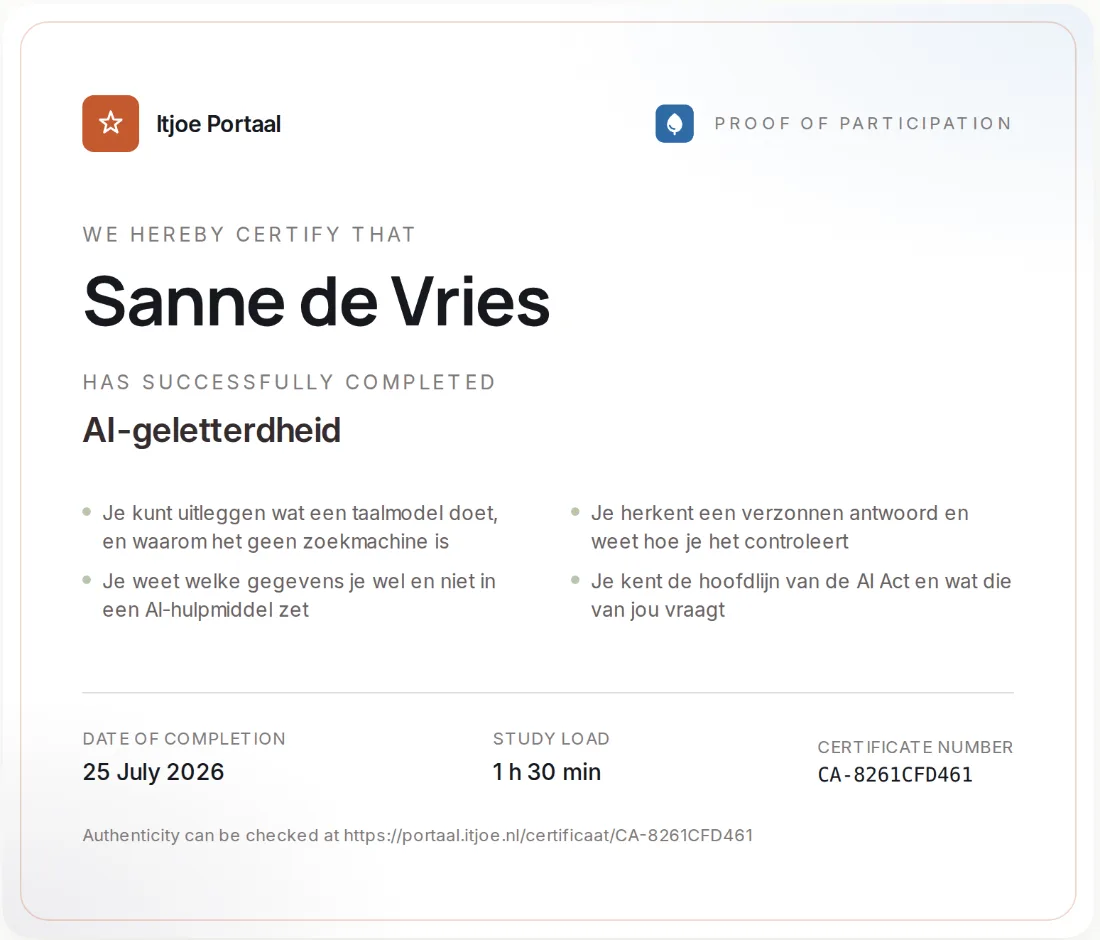
05 · The certificate
A certificate, plus the proof to go with it.
The certificate is issued automatically after the final test. It is publicly verifiable at its own address, added to LinkedIn in one click, and it carries your own organisation's logo.
BoundaryThe certificate goes to the participant. Your employer sees the number, not your answers.
Itjoe · example
Microsoft 365 Copilot Online Workshop
- Issuedautomatically, after the final test
- Authenticitypublicly verifiable at its own address
- LinkedInadded in one click
- Logoyour own organisation's
Learning moments26 / 26
Try one daily session yourself?
In the demo we open up an app module, so you can see what a learning moment looks like.